
If you’re having trouble logging in, take a moment to read the error messages the system is giving you.
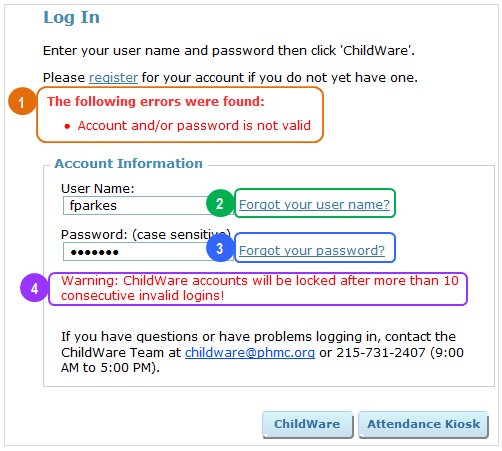
 Most of the time, the problem is that you mistyped or forgot your password or username. Take a moment to make sure your username and password are entered correctly. Remember that your password is case-sensitive.
 If you’ve forgotten your username, click ‘Forgot your username?’ and follow the instructions.
 If you’ve forgotten your password, click ‘Forgot your password?’ and follow the instructions.
 The most important thing to remember is that if you aren’t sure what your password and/or username is, don’t keep trying to log in. For security reasons, your account will be locked after 5 unsuccessful attempts (this helps block potential hackers). At that point, you will have to contact us to have your account unlocked. Instead, just select ‘Forgot your username?’ or ‘Forgot your password?’ and follow the brief steps that will get you right back into ChildWare and on with your day.
 ChildWare