ChildWare

ChildWare

Search
Skip to content
  • HOME
  • ABOUT
    • About ChildWare
    • State-Specific Software
    • Targeted TA
    • Policies and Procedures
    • Becoming a ChildWare User
  • QUALITY MANAGEMENT
    • QUALITY MANAGEMENT
    • Keystone STARS
    • DHS Compliance
  • PROVIDER SUPPORT
    • PROVIDER SUPPORT
    • PHL PreK Users
    • Basic Overview
    • ChildWare Documentation
    • How To Guides
    • How To Videos
    • Troubleshooting
    • User Manual
  • CONTACT
  • LOGIN
troubleshooting

How Do I Change My Password?

May 7, 2014 childware

First, be sure you want to change, rather than reset your password. If you have forgotten your password and need a new one created for you, you need to reset your password by clicking “Forgot Password”. Instructions for that are here.

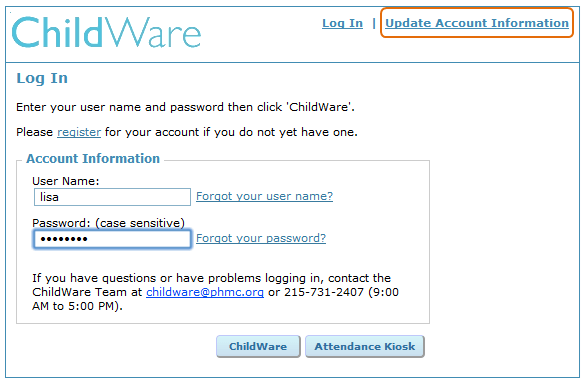
If you know your password (or have just been assigned a long and complicated password by the system) and want to change it, enter your username and password as usual. Then, instead of clicking “ChildWare”, select “Update Account Information” and follow the instructions to change your password.
pwdreset

loginpassword

Post navigation

Previous PostBatch Updates for Child RecordsNext PostAttendance & Time Tracker Guide

Troubleshooting

Back to Main Troubleshooting Page

Need Assistance?

orange

ALL CLEAR May 16, 2023

Thank you for your ongoing patience and understanding as our parent company PHMC's Information Technology team continues to respond to and rectify the attempted ransomware attack that took place on May 8, 2023. The application has now been turned back on to user access!

Note that users may experience slowness in the application or page errors as there is a higher than normal volume of users accessing the system at this time.

The help desk has also been restored. Moving forward, please use helpdesk@phmc.org to log a help desk ticket. Remember to identify yourself as a ChildWare customer as this application is shared by other PHMC systems.


RELATED

  • Staff Log
  • Logs
  • 1.2 Your ChildWare Home Page
  • How Do I Change My Password?
  • Why Can’t I Log In?
  • 1.1 Logging In to ChildWare
Blog at WordPress.com.
  • Reblog
  • Subscribe Subscribed
    • ChildWare
    • Already have a WordPress.com account? Log in now.
    • ChildWare
    • Subscribe Subscribed
    • Sign up
    • Log in
    • Copy shortlink
    • Report this content
    • View post in Reader
    • Manage subscriptions
    • Collapse this bar
 

Loading Comments...